Jamvant: The Forgotten Voice
By Team Cryptonite · 2 min read
About the CTF: Pinaka CTF
When Hanuman forgot his own strength, one voice reminded him of it - Jamvant's. We recovered footage from that shore. It looks ordinary. It isn't. Jamvant never stopped speaking - his reminder is still buried in it,…
**Pinaka CTF 2026** · Forensics · Team Cryptonite · All 44 Pinaka write-ups
Challenge
> When Hanuman forgot his own strength, one voice reminded him of it - Jamvant's.
> We recovered footage from that shore. It looks ordinary. It isn't. Jamvant never stopped speaking - his reminder is still buried in it, waiting for someone who knows how to look at sound.
> "The power was always in you. So is the answer - you just haven't learned to see it yet."
We're given jamvant_hidden.mp4.
"Look at sound" and "learn to see it" pretty much point straight at the audio track, so that's where I started, also i changed it to jamvant.mp4
Recon
First, a look at what's in the file:
ffprobe -hide_banner jamvant.mp4
Input #0, mov,mp4,m4a,3gp,3g2,mj2, from 'jamvant.mp4':
  Metadata:
    major_brand     : isom
    minor_version   : 512
    compatible_brands: isomiso2avc1mp41
    encoder         : Lavf60.16.100
  Duration: 00:06:07.01, start: 0.000000, bitrate: 359 kb/s
  Stream #0:0[0x1](und): Video: h264 (Main) (avc1 / 0x31637661), yuv420p(tv, bt709, progressive), 640x360 [SAR 1:1 DAR 16:9], 191 kb/s, 24 fps, 24 tbr, 12288 tbn (default)
    Metadata:
      handler_name    : VideoHandler
  Stream #0:1[0x2](und): Audio: aac (LC) (mp4a / 0x6134706D), 44100 Hz, stereo, fltp, 162 kb/s (default)
    Metadata:
      handler_name    : SoundHandler
The video is a normal 6:07 clip with an h264 video stream and AAC stereo audio at 44.1 kHz. Nothing stands out in the metadata, and running strings turned up nothing useful either.
Looking at the sound
I pulled the audio out as mono WAV and rendered a spectrogram:
ffmpeg -i jamvant.mp4 -vn -ac 1 a.wav
ffmpeg -i a.wav -lavfi showspectrumpic=s=2000x1000:legend=1:scale=log -update 1 spec.png
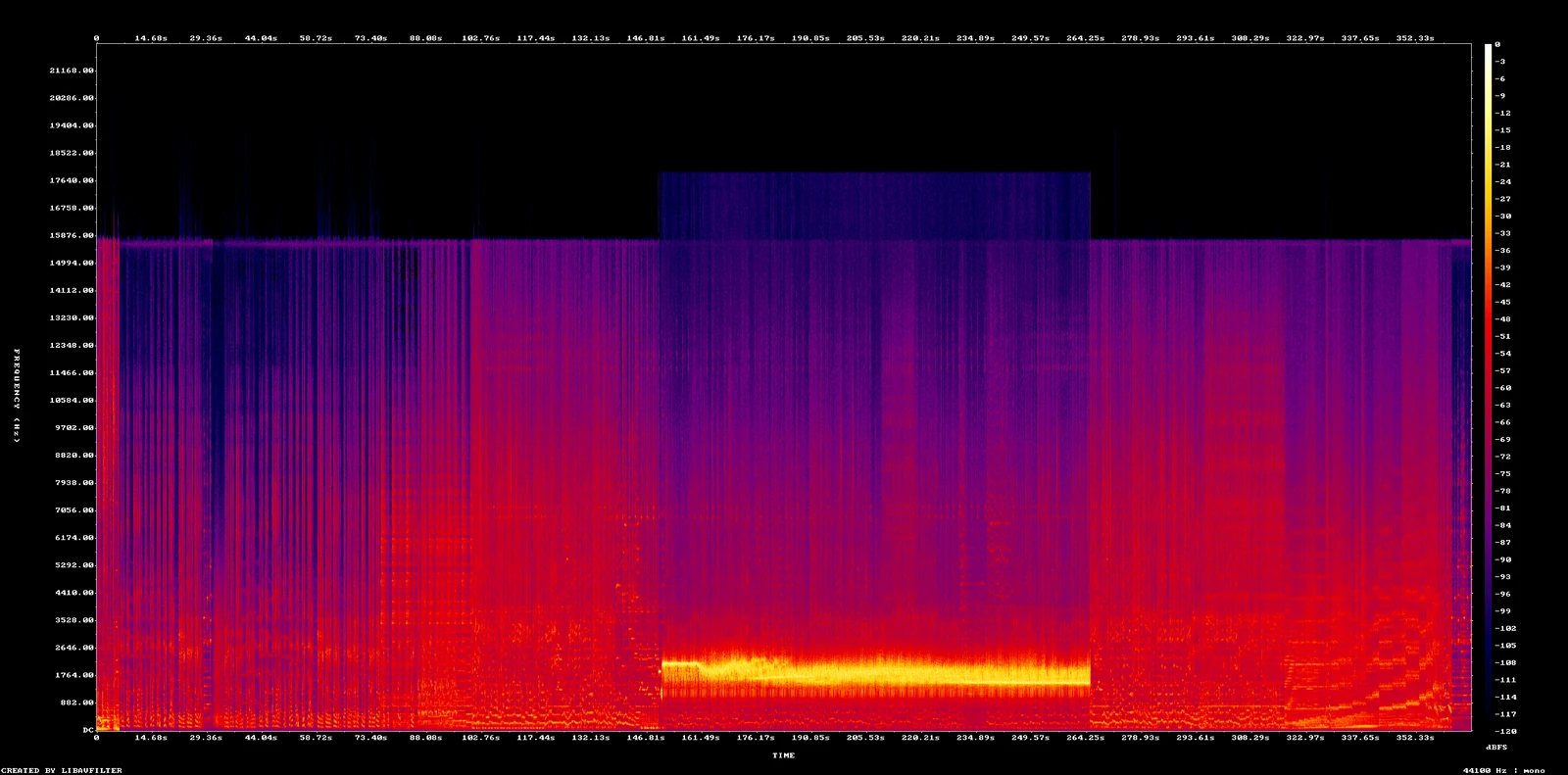
Most of the track looks like ordinary soundtrack audio, but the section from roughly 150s to 265s is clearly different:
- the content above ~2.3 kHz mostly drops away
- a single bright band sits between about 1200 and 2300 Hz
- it starts with a steady tone at around 1900 Hz
That frequency range plus the 1900 Hz lead-in is the signature of SSTV (slow-scan television). SSTV sends 1900 Hz as a leader tone, uses 1200 Hz pulses for sync, and maps pixel brightness to frequencies between 1500 Hz (black) and 2300 Hz (white). If you play that part of the clip, it sounds like a fax machine or modem, which confirms it.
Extracting the signal
I cut out just that section, with a few seconds of margin on either side:
ffmpeg -i a.wav -ss 145 -t 125 seg.wav
ffmpeg version 9.0.2 Copyright (c) 2000-2026 the FFmpeg developers
  built with Apple clang version 17.0.0 (clang-1700.6.4.2)
  configuration: --prefix=/opt/homebrew/Cellar/ffmpeg/9.0.2_1 --enable-shared --enable-pthreads --enable-version3 --cc=clang --host-cflags= --host-ldflags= --enable-ffplay --enable-gpl --enable-libsvtav1 --enable-libopus --enable-libx264 --enable-libmp3lame --enable-libdav1d --enable-libvmaf --enable-libvpx --enable-libx265 --enable-openssl --enable-videotoolbox --enable-audiotoolbox --enable-neon
  libavutil      61.  1.102 / 61.  1.102
  libavcodec     63.  1.102 / 63.  1.102
  libavformat    63.  1.102 / 63.  1.102
  libavdevice    63.  1.102 / 63.  1.102
  libavfilter    12.  1.102 / 12.  1.102
  libswscale     10.  1.102 / 10.  1.102
  libswresample   7.  1.102 /  7.  1.102
[aist#0:0/pcm_s16le @ 0x1587045d0] Guessed Channel Layout: mono
Input #0, wav, from 'a.wav':
  Metadata:
    encoder         : Lavf63.1.102
  Duration: 00:06:07.01, bitrate: 705 kb/s
  Stream #0:0: Audio: pcm_s16le ([1][0][0][0] / 0x0001), 44100 Hz, mono, s16, 705 kb/s
Stream mapping:
  Stream #0:0 -> #0:0 (pcm_s16le (native) -> pcm_s16le (native))
Press [q] to stop, [?] for help
Output #0, wav, to 'seg.wav':
  Metadata:
    ISFT            : Lavf63.1.102
  Stream #0:0: Audio: pcm_s16le ([1][0][0][0] / 0x0001), 44100 Hz, mono, s16, 705 kb/s
    Metadata:
      encoder         : Lavc63.1.102 pcm_s16le
[out#0/wav @ 0x60000100c180] video:0KiB audio:10767KiB subtitle:0KiB other streams:0KiB global headers:0KiB muxing overhead: 0.000707%
size=   10767KiB time=00:02:05.00 bitrate= 705.6kbits/s speed=9.84e+03x elapsed=0:00:00.01
Decoding SSTV
I used colaclanth's sstv decoder, installed from github.
git clone https://github.com/colaclanth/sstv && pip3 install ./sstv
On macOS (Apple Silicon) it pulls in the old PySoundFile, which doesn't include libsndfile. Replacing it with the current soundfile fixes that:
pip3 uninstall -y PySoundFile
pip3 install soundfile
Then decode:
sstv -d seg.wav -o out.png
[sstv] Searching for calibration header... Found!
[sstv] Detected SSTV mode Martin 1
[sstv] Decoding image...   [##############################################] 100%
[sstv] Drawing image data...
[sstv] ...Done!
The decoder finds the calibration header, detects Martin 1 mode and draws the image.
Flag
open out.png

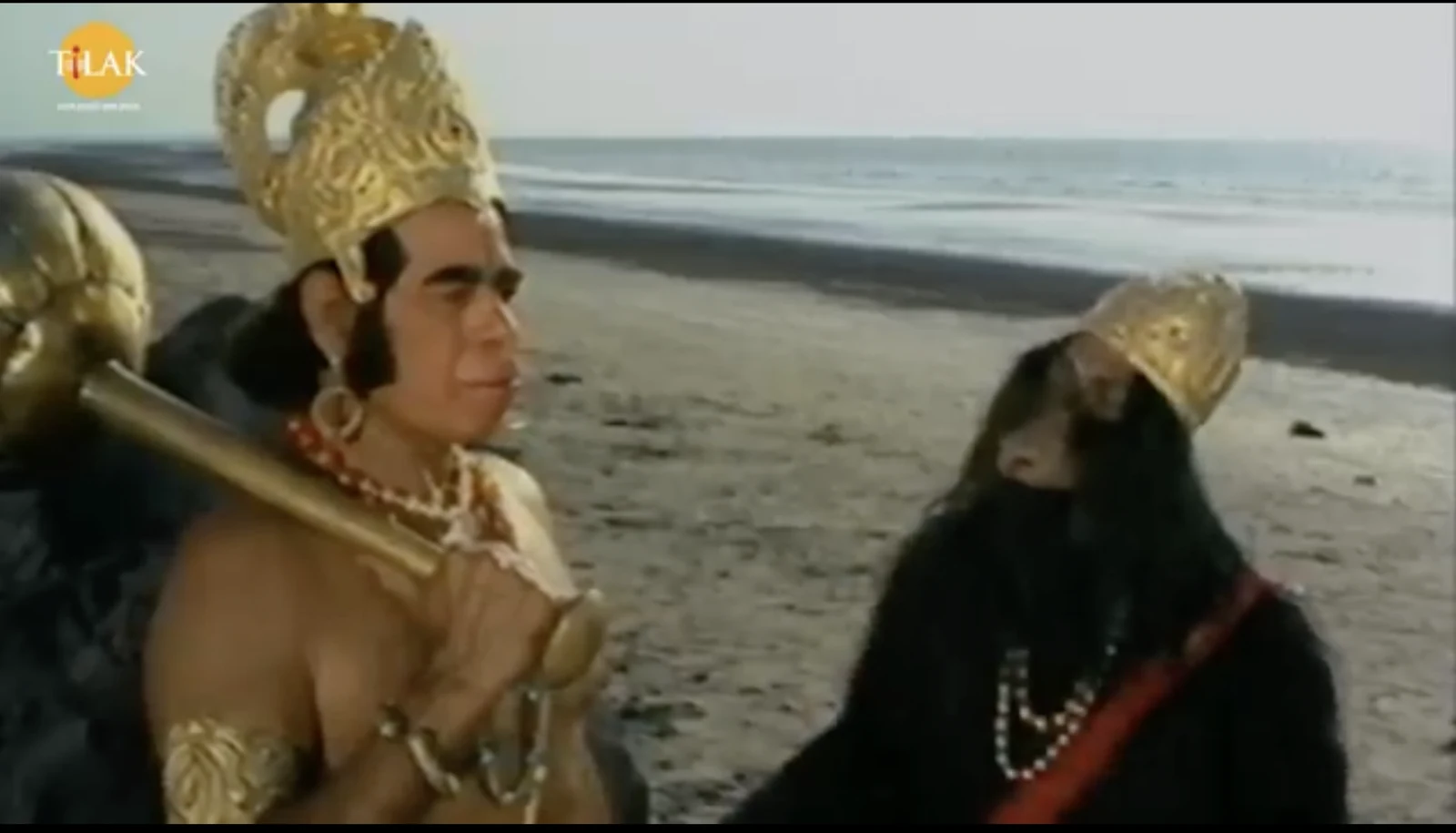
The decoded image shows Jamvant and Hanuman on the shore, with the flag written in the sand:
PINAKA{JAI_SHR1_R4M}
I also went to this exact time in the video, but ofc it wasnt there:
Summary
- The hint about "seeing sound" points to the spectrogram of the audio.
- The spectrogram shows a 1200-2300 Hz band with a 1900 Hz leader between 150s and 265s, which is SSTV.
- Cut that section out and decode it with an SSTV decoder (it's in Martin 1 mode).
- The flag is written in the sand in the decoded image.