Proxy Server: How It Works, Benefits, and Real-World Applications
By anonymous · 29 min read
Proxy Server: How It Works, Benefits, and Real-World Applications
Proxy Server: How It Works, Benefits, and Real-World Applications
Every time you visit a website, your device sends a request directly to that website. Normally, the destination server can see your IP address, location, and other connection details. A Proxy Server changes this communication process by acting as an intermediary between the client and the destination server.
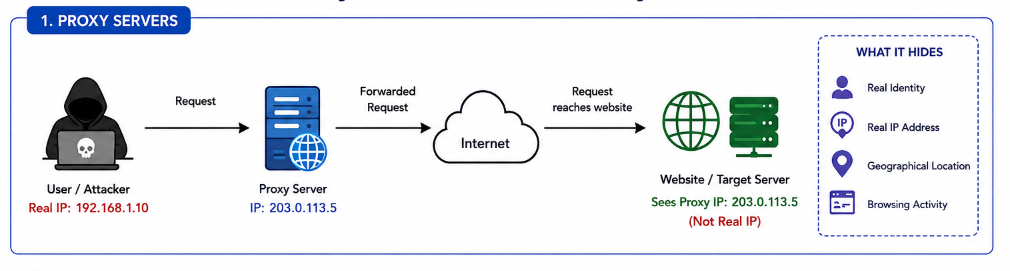
Instead of connecting directly to the website, your request first reaches the proxy server. The proxy then forwards the request on your behalf, receives the response from the website, and sends it back to you. Because the website only communicates with the proxy server, it sees the proxy's IP address rather than your real IP address.
What is a Proxy Server?
A Proxy Server is an intermediary server that receives requests from a client (user) and forwards them to the destination server. It acts as a gateway between users and the internet, allowing communication to pass through the proxy before reaching the target website.
By replacing the client's IP address with its own, a proxy server helps hide the user's real identity from the destination server while also enabling traffic monitoring, filtering, caching, and access control.
How Does a Proxy Server Work?
The working process of a proxy server can be explained in six simple steps.
Step 1: User Sends a Request
When a user enters a website URL such as www.example.com into a web browser, the browser creates an HTTP or HTTPS request.
Instead of sending this request directly to the website, it is first sent to the configured proxy server.
Step 2: Proxy Server Receives the Request
The proxy server receives the client's request and analyzes it.
Depending on its configuration, the proxy may:
- Verify whether the user has permission to access the requested website.
- Apply security or content filtering policies.
- Check whether the requested content is already stored in its cache.
- Log network activity for monitoring purposes.
If the request satisfies all configured rules, the proxy proceeds to the next step.
Step 3: Proxy Forwards the Request
The proxy server forwards the client's request to the destination website using its own public IP address.
For example:
- User IP Address:
192.168.1.10 - Proxy Server IP:
203.0.113.5
From the website's perspective, the request appears to originate from 203.0.113.5, not from the user's actual IP address.
Step 4: Destination Website Processes the Request
The destination web server processes the incoming request exactly as it would for any normal visitor.
Since the connection originates from the proxy server, the website records the proxy's IP address instead of the client's real IP.
The user's original IP address remains hidden from the destination server.
Step 5: Website Sends the Response
After processing the request, the destination server generates a response containing the requested webpage, file, image, or other data.
This response is sent back to the proxy server rather than directly to the user.
Step 6: Proxy Delivers the Response
The proxy server receives the response from the website and forwards it to the client.
To the user, the browsing experience appears normal, even though all communication has passed through the proxy server.
Request Flow
Client (User)
      │
      ▼
Proxy Server
      │
      ▼
Internet
      │
      ▼
Target Website
      │
      ▲
Response
      │
      ▲
Proxy Server
      │
      ▲
Client (User)
Why Are Proxy Servers Used?
Proxy servers provide several important networking and security functions.
Privacy
Since websites only see the proxy server's IP address, the user's actual IP address remains hidden.
Security
Organizations use proxy servers to inspect and filter network traffic before it reaches users or internal systems.
Content Filtering
Schools, colleges, and companies often block access to specific websites by configuring rules on proxy servers.
Performance Improvement
Frequently accessed web pages can be stored in the proxy's cache, reducing bandwidth usage and improving browsing speed.
Network Monitoring
Administrators can log and monitor user activity to enforce security policies and detect suspicious behavior.
Real-World Applications
Proxy servers are commonly used in:
- Corporate networks
- Educational institutions
- Government organizations
- Web caching systems
- Content filtering solutions
- Enterprise security gateways
- Load balancing infrastructures
Advantages
- Hides the user's real IP address.
- Improves user privacy.
- Filters malicious or unwanted websites.
- Reduces bandwidth usage through caching.
- Enables network monitoring and access control.
- Enhances organizational security.
Limitations
- Most standard proxy servers do not encrypt internet traffic.
- Proxy administrators may be able to view user activity.
- A slow proxy server can reduce browsing performance.
- Some websites detect and block known proxy server IP addresses.
Conclusion
A Proxy Server acts as an intermediary between a client and a destination server, forwarding requests and responses while masking the client's real IP address. Besides improving privacy, proxy servers are widely used for security, traffic filtering, content caching, and network management. They are an essential component of modern enterprise networks and internet infrastructure, providing both performance and administrative benefits while helping organizations maintain greater control over web traffic.